
Manage your API token
To add Appwarden to your web project, create an Appwarden API token. This token authenticates your application with Appwarden’s monitoring infrastructure.
The Appwarden API token is sensitive and should be treated like a password. Do not share it with anyone or store it in a public repository. If using in a GitHub Actions workflow, please store it as a secret.
API tokens are managed through the Appwarden dashboard. Navigate to Settings > Monitoring to view the API Token card.
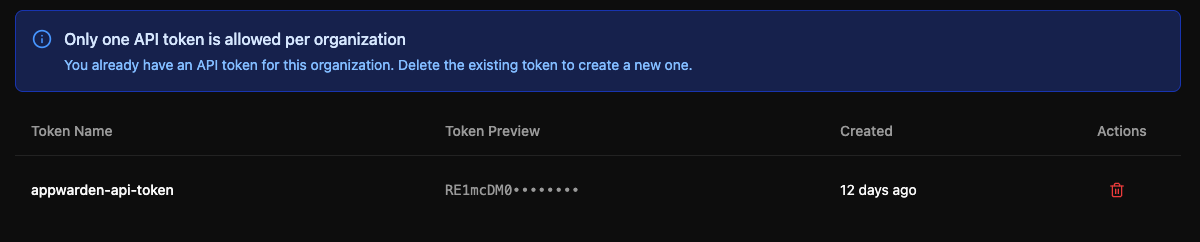
Each organization can have one active API token at a time. To create a new token, you must first delete the existing one.
- Sign in to the Appwarden dashboard
- Navigate to Settings > Monitoring
- Find the API Token card
If you have an existing token, the dashboard displays a table showing:
- Token Name — The descriptive name you gave the token when creating it
- Created — When the token was created (shown as relative time, e.g., “2 days ago”)
- Actions — A delete button (trash icon) to remove the token
If no token exists, you’ll see an empty state with a Create API Token button.
- Navigate to Settings > Monitoring in the dashboard
- Click the Create API Token button
- Enter a descriptive name for your token (default:
appwarden-api-token) - Click Create
After creation, a modal displays your new token value. The token is only shown once, so be sure to copy it immediately.
To copy your token:
- Click the copy button next to the token field, or
- Click the eye icon to reveal the token, then copy it manually
Before closing the modal, you must check the confirmation checkbox to acknowledge that you’ve saved the token securely. Store your token in a secure location such as:
- GitHub Actions secrets
- Vercel or Cloudflare secrets
If your token is lost, revealed, or otherwise compromised, you should delete it immediately.
- Navigate to Settings > Monitoring in the dashboard
- Find the token in the API Token table
- Click the trash icon in the Actions column
- Review the warning message in the confirmation dialog
- Click Delete to confirm
To allow safe token replacement without interruption, destroyed tokens remain valid for 5 minutes.
Once a token is deleted, you can create a new one by following the creation steps above.