
@appwarden/build-cloudflare-action
@appwarden/build-cloudflare-action is open source software
that provides an easy-to-use GitHub Action for building and deploying Appwarden middleware to your Cloudflare domain. It generates a single Cloudflare Worker that protects all configured hostnames based on your Appwarden domain configuration.
For the product guide, start with Protect your Cloudflare project with Appwarden. If you still need to define the hostnames and settings the action will deploy, use the domain configuration guide. For CSP-specific behavior after deployment, see Managing your Content Security Policy.




Easy-to-use GitHub Action to build Appwarden for deployment to your Cloudflare project.
Read the docs to get started
- 🚀 Automated Middleware Generation: Generates Cloudflare middleware populated with your Appwarden domain configuration compatible with any website
- 🛡️ Security Configuration: Configures Content Security Policy (CSP) and lock page settings
- 🧪 Debug Mode: Built-in debug mode for troubleshooting deployments
- 📦 Zero Configuration: Works out of the box with minimal setup required
This GitHub Action is the official and recommended way to install Appwarden on any website deployed on Cloudflare.
The action automatically deploys the most up-to-date version of Appwarden without requiring any additional configuration. Your middleware stays current with the latest security features and improvements.
Your middleware configuration is automatically applied from your domain configuration file. Simply define your settings once, and the action handles the rest.
This action fully supports Appwarden’s nonce-based Content Security Policy (CSP) functionality, enabling robust protection against browser-based attacks while maintaining compatibility with your application.
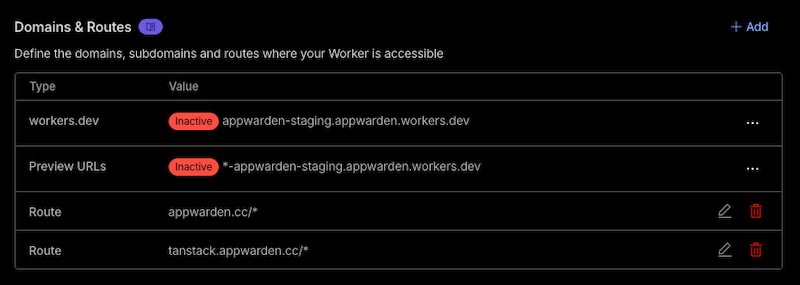
The action builds a Cloudflare Worker script that runs on every request to the hostnames listed in the middleware section of your domain configuration files.
For example, given this domain configuration:
hostname: appwarden.ccversion: 1websites: middleware: - url: appwarden.cc options: lock-page-slug: /maintenance csp-mode: report-only csp-directives: script-src: - "self" - "{{nonce}}" - url: tanstack.appwarden.cc options: lock-page-slug: /maintenance csp-mode: enforced csp-directives: img-src: - "self"Deploying the Cloudflare Worker script generated by this action will include a route for each configured hostname:
| Input | Description | Required | Default |
|---|---|---|---|
cloudflare-account-id | Cloudflare account id | ✅ | - |
appwarden-api-token | Appwarden API token | ✅ | - |
debug | Enable debug mode | ❌ | false |
| Output | Description |
|---|---|
middlewareVersion | The version of @appwarden/middleware that was deployed |
hostnames | Comma-separated list of hostnames the middleware was deployed to |
name: 🤖 Deploy Appwarden on Cloudflare on: push: branches: - mainenv: CLOUDFLARE_ACCOUNT_ID: ${{ vars.CLOUDFLARE_ACCOUNT_ID }} APPWARDEN_API_TOKEN: ${{ secrets.APPWARDEN_API_TOKEN }} CLOUDFLARE_API_TOKEN: ${{ secrets.CLOUDFLARE_API_TOKEN }}jobs: deploy-appwarden: name: Deploy Appwarden runs-on: ubuntu-latest steps: - uses: actions/checkout@v4 - name: Setup node uses: actions/setup-node@v4 - name: Setup npm run: npm ci --ignore-scripts # This builds the Appwarden middleware for Cloudflare - name: Build @appwarden/middleware id: build uses: appwarden/build-cloudflare-action@v3 with: debug: true cloudflare-account-id: ${{ env.CLOUDFLARE_ACCOUNT_ID }} appwarden-api-token: ${{ env.APPWARDEN_API_TOKEN }} # This deploys the Appwarden middleware to Cloudflare - name: Deploy to Cloudflare uses: cloudflare/wrangler-action@v3.14.1 env: APPWARDEN_API_TOKEN: ${{ env.APPWARDEN_API_TOKEN }} with: packageManager: npm # 4️⃣ add your package manager (e.g. npm, yarn, or pnpm) workingDirectory: .appwarden/generated-middleware environment: production accountId: ${{ env.CLOUDFLARE_ACCOUNT_ID }} apiToken: ${{ env.CLOUDFLARE_API_TOKEN }} secrets: | APPWARDEN_API_TOKEN - name: Deployment successful run: | echo "::notice::✅ Appwarden middleware v${{ steps.build.outputs.middlewareVersion }} deployed successfully to: ${{ steps.build.outputs.hostnames }} | View in Cloudflare dashboard: https://dash.cloudflare.com/${{ env.CLOUDFLARE_ACCOUNT_ID }}/workers-and-pages"Read the docs to learn more
- Node.js 22+
- npm
# Clone the repositorygit clone https://github.com/appwarden/build-cloudflare-action.gitcd build-cloudflare-action
# Install dependenciesnpm installThis project uses Vitest for testing with comprehensive unit tests:
# Run tests in watch modenpm test
# Run tests oncenpm run test:run
# Run tests with coveragenpm run test:coverageThe test suite includes:
- Unit tests for the main action logic
- Template tests for Wrangler configuration generation
- Validation tests for input schemas and domain validation
- Mock tests for external API calls and file system operations
# Format codenpm run format
# Check formattingnpm run check:prettier
# Type checkingnpm run check:types
# Build the actionnpm run buildMIT